Effects (reverb, chorus, echo)
This feature adds some new reverb and chorus effects, adds an echo effect, and applies them per layer rather than globally.
New echo effect
In addition to reverb, and chorus, this function adds a new user-adjustable echo effects. The user can define three different types of echo (imaginatively labelled A, B, and C) and then apply them to layers as desired - each layer can have one of the three echo types, or none. This enables some layers to have very fast, single pulse, slapback type echoes, whereas other layers can have many gradual fading notes sounding.
Although the time between echoes is part of the layer effects page (see later), the parameters of the echo itself are setup within the effects menu.
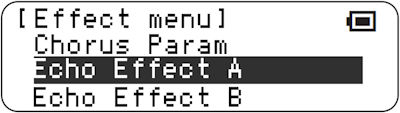 |
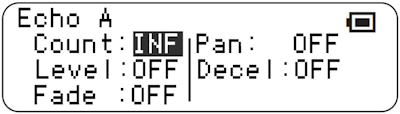 |
|---|
This has the following parameters:
Count : Options are Infinite, 1, 2, or 3. For settings other than infinite, this limits the number of echoes coming after the note.
Level : Options are OFF, -32, -48 or -64. This sets the base note velocity (effectively volume) that the echoes are played at. For the TNR default note velocity of 100, choosing -48 means the echos start at half the velocity of initially played note.
Fade : Options are 0, -8, -16, -24. This sets the change in velocity for subsequent echoes. Choosing -8 means that the echoes fade away slowly, -24 means they fade fast.
Pan : Options are OFF, Near, Mid and Wide. This rather limited effect causes echoes to ping-pong between stereo positions, with the stereo separation either relatively small, or wide. This effect is clumsy and only really suitable for notes with short duration, because the TNR has to pan the whole layer from left to right.
Decel : Options are OFF or ON. When active, the time gap between subsequent echoes increases by about 25% each echo, slowing down gradually.
Note that the combination of Count=INF and Fade=0 would mean that the echoes would never end and the number of playing sounds would quickly exceed the TNR capability; consequently this combination is treated as if Fader were a very gentle -4.
The layers reverb and chorus settings are applied to echoing notes.
Note 1 : echo doesn’t work very well with Push mode, since the velocity of the original playing note is unavoidably modified by the echo. There might be a fix for this but I haven’t found it yet.
Note 2 : Echoes are not currently delayed for performance reasons. Let me know if this causes an issue!
Additional reverb & chorus effects
The stock TNR firmware has 9 reverb types (Hall 1 & 2, Room 1-3, Stage 1 & 2, and Plate 1 & 2) and 5 chorus types (Chorus 1-3, and Flanger 1 & 2). In fact more types are available as can be seen in both the response to remote mode commands, the MIDI implementation chart from other Yamaha devices with identical hardware, as well as dissassembly of the TG code.
This feature adds:
- 3 more reverb types : Hall 3, Stage 3, Plate 3
- 2 more reverb types : Flanger 3 and Celeste.
These are accessible under the Effects menu. There is barely any audible difference. This results in the following MIDI implementation chart for reverb types:
| TYPE | TYPE LSB | ||||||||
|---|---|---|---|---|---|---|---|---|---|
| MSB | 0 | 1 | 2 | 8 | 16 | 17 | 18 | 19 | 20 |
| 0 | No Effect | ||||||||
| 1 | Hall 1 | Hall 2 | Hall 3 | ||||||
| 2 | Room 1 | Room 2 | Room 3 | ||||||
| 3 | Stage 1 | Stage 2 | Stage 3 | ||||||
| 4 | Plate 1 | Plate 2 | Plate 3 | ||||||
| 5..127 | No Effect | ||||||||
This results in the following MIDI implementation chart for chorus types:
| TYPE | TYPE LSB | ||||||||
|---|---|---|---|---|---|---|---|---|---|
| MSB | 0 | 1 | 2 | 8 | 16 | 17 | 18 | 19 | 20 |
| 0..64 | No Effect | ||||||||
| 65 | Chorus 1 | Chorus 2 | |||||||
| 66 | Celeste | Chorus 3 | |||||||
| 67 | Flanger 1 | Flanger 2 | Flanger 3 | ||||||
| 68..127 | No Effect | ||||||||
Per layer effects
The stock firmware applies these effects to all layers, as a global setting. Whether the effect is applied or not can now be selected on a per-layer basis. This is selected from within the layer menu:
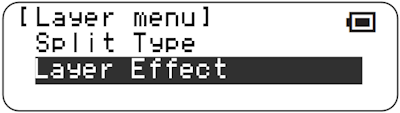 |
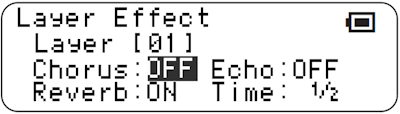 |
|---|
This has the following parameters:
Chorus : Options are ON or OFF. The layer either has the global chorus effect (Flanger, Celeste, etc.) applied at the level defined by the chorus parameter, or it has no chorus at all.
Reverb : Options are ON or OFF. The layer either has the global reverb (Stage, Room, etc.) effect applied at the level defined by the reverb parameter, or it has no reverb at all.
Echo : Options are OFF, A B or C. The layer either has no echo, or one of the three echo types applied (A, B, or C) as described above.
Time : Options are ¼, ½, 1, 1½, 2, 2⅔, 3, 4, 5, 5⅔, 6, 6⅓, 7, 8 , 12 or 16. This is the delay between echos. The units are a bit arbitrary, but, at a loop speed of 8, choosing a setting of 1 will result in the echo of a note in score mode in column 1 being simultaneous with a note in column 2.
Like Reverb and Chorus settings, echos are saved in “all blocks” files as well as by “Save As Default” under System menu.
Compatibility Issues
None known.
Releases
Additional types unlocked in A034. Echo effect and per-layer effects added in A044.